> For the complete documentation index, see [llms.txt](https://soporte.optiwe.com/llms.txt). Markdown versions of documentation pages are available by appending `.md` to page URLs; this page is available as [Markdown](https://soporte.optiwe.com/panel-de-control/bots-de-conversacion.md).
# Bots de conversación
Cómo configurar chatbots diferenciados por canal
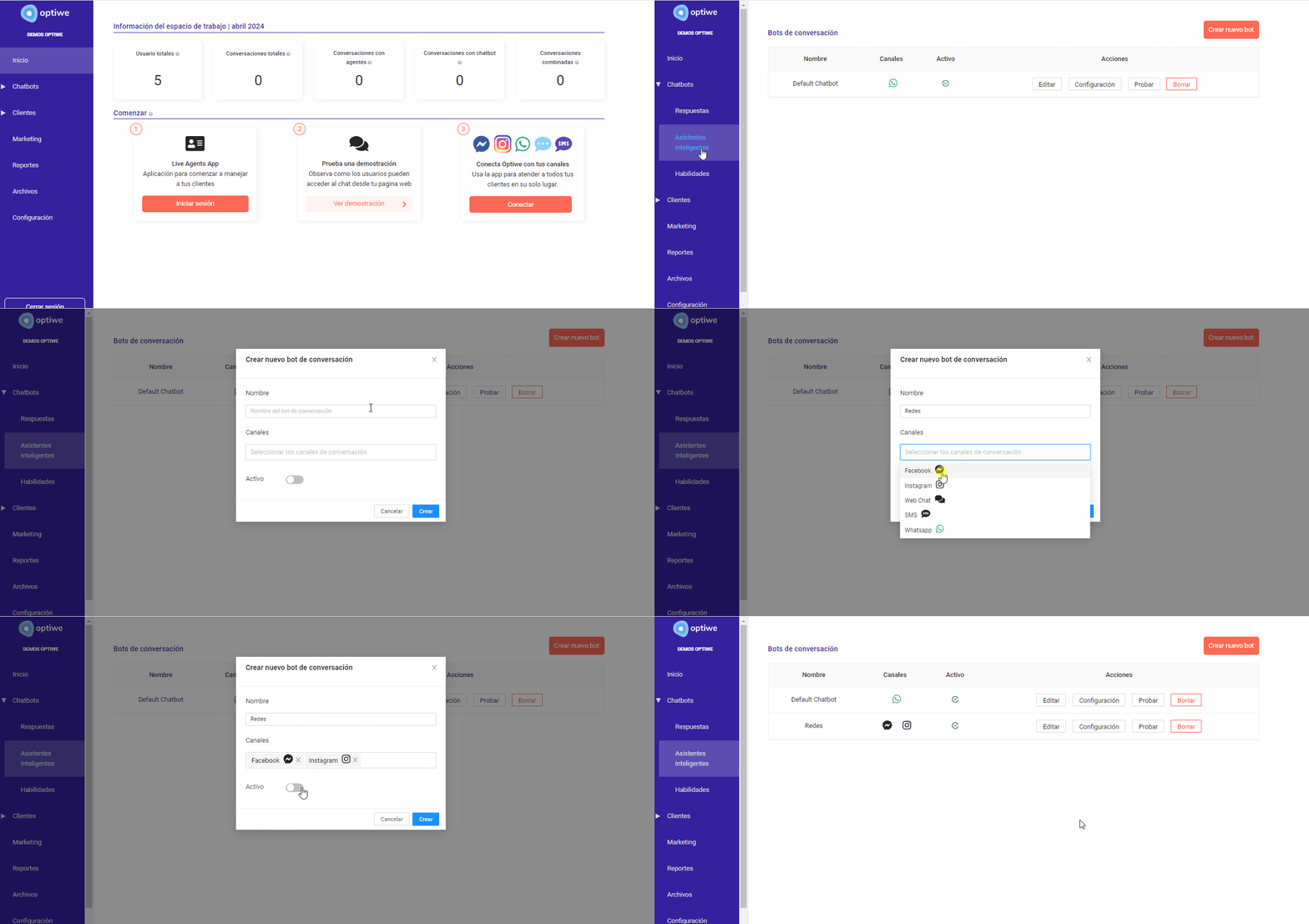
Desde la opción *Asistentes inteligentes -> Chatbots* del menú principal, puedes crear bot personalizados para cada canal:
{% hint style="info" %}
[Se ](#user-content-fn-1)[^1]puede habilitar sólo 1 bot por canal
{% endhint %}
#### CREAR UN BOT
Desde el botón **Crear bot,** configurar nombre, canales y activarlo.
También es posible desde el botón **Editar**, realizar cambios sobre esos mismos aspectos.
En la siguiente sección verás como [configurar](/panel-de-control/bots-de-conversacion/configuracion.md) el flujo de cada bot en particular.
[^1]: